Frequently Asked Questions
School-related FAQs
What are the benefits of the StepUp program?What state assessments do you support?
What Grades does Lumos StepUp program support?
How can I register/enroll my school in the Lumos StepUp program?
What is the duration of the free trial/pilot?
Do you take purchase orders?
How can I get support?
What are the key benefits of the StepUp program?
Does Lumos help At-Risk Students?
Can Teachers Use the Lumos Programs to Extend Classroom Learning Time?
How to Blend e-Learning with Classroom Learning?
Login/Profile related FAQs
Where do I sign up?How do I change my password?
How do I reset my student password?
Can I please delete this online login account?
Student related FAQs
Where can I view the sample answers and detailed explanations?How do I check the progress of my students?
How to add students?
Where do I find my custom lessons?
What is a custom assessment?
What are my stickies?
What is a Diagnostic report?
What is an insight lessons report?
What is EdSearch?
What is Lumos Assistant?
What is IEP feature?
How to archive students?
How to unarchive the students?
How does a coherence map help?
Students are having difficulty logging into the program from public/shared computers.
Where do I find the personalized study plan?
Does Lumos explain to the student what they did wrong?
tedBook related FAQs
Where can I purchase the books from?How do I add a book?
How do I add books with the same access code?
How do I add another tedBook without the students having to log in and put in the class code again?
How do I remove a tedbook?
I teach multiple grades. Can I have access to various books online?
Pricing / Subscription related FAQs
How much does your program cost?How much does it cost to download the worksheets we do not have student computers?
What subjects will my subscription include?
How can I purchase from within my account?
How do I cancel my subscription?
Do you offer any discounts?
I can’t find my school when signing up for a free account; What should I do?
Inviting parent through teacher/student portal
How to invite Parents?Who can invite the parent?
How to invite parents from the teacher portal?
How to invite parents from the student portal?
How does the parent log in from the invite sent by a teacher?
How does the parent log-in?
What are the resources available to the parent when invited by a teacher?
How does the parent check the progress of the child?
What subjects can a parent view?
How can a parent assign if he/she wants to give additional practice?
Can the parent grade the assignments?
Libraries
How do I access the Lumos Online Study Program?
Do I need to log in using the library site every time?
How can my library subscribe to the Lumos Study Program?
Library Portal
Training Program Information
After signing up, How do I access the practice workbooks and tests?
What is the recommended way to use this study program?
Where can I track my child’s progress?
How can I help my child learn difficult concepts?
Where can I review incorrect answers?
Can I change the grade level halfway through the year?
Account information
How do I change my profile?How do I contact you?
How do I retrieve my lost password?
How do I remove myself from your mailing list?
Can the tests be retaken using the same account access?
Billing
What payment methods do you accept?
General Information
What software do I need?Should I buy books or an online program?
How soon will I have access after I sign up?
Do I need to register?
Will I receive anything in the mail?
My Students are being logged off in between the test.
School-related FAQs
What are the benefits of the StepUp program?
You can With StepUp, you will get access to TWO Full-Length state assessment practice tests.
You will have access to personalized learning recommendations & homework help By Lumos Assistant.
1. Improve state assessment Scores
2. Ensure Skills Mastery
3. Visibility to Student Progress
4. Personalized Learning Experience
5. AI Powered Lumos Assistant
6. One-on-One Sessions With Lumos Coach
7. Fun & Comprehensive Learning Content
8. 24/7/365 Access and Support
To more about StepUp program. Please click here
What state assessments do you support?
We support 17 state assessments. To know more about the assessments that we support, please click the below link.
What Grades does Lumos StepUp program support?
Lumos StepUp program supports grade 2 to High School
Click to Know More
How can I register/enroll my school in the Lumos StepUp program?
Click on the link below and select your state standardized test to know more about the program and purchase.
Click Here
What is the duration of the free trial/pilot?
The duration of the free trial/pilot is for about a month.
Do you take purchase orders?
Yes, we do take purchase orders and card payments. Feel free to talk to our product specialist to know more.
How can I get support?
You can get support through the following communication modules:
Email: support@lumoslearning.com
Phone: 888-309-8227 / 732-384-0146
Live Chat at the bottom right corner of the website
Click to know more
What are the key benefits of the StepUp program?
The key benefits of the StepUp program are:
* Improves state standardized test scores by providing realistic assessment rehearsal
* Provides individualized Homework Help
* Fun, Comprehensive Learning Content
Teacher Portal
* Personalized Learning Experience
* Convenient 24/7/365 Access
Click to know more
Does Lumos help At-Risk Students?
Yes, Lumos Learning Supplemental programs have been successfully used to assist At-Risk students. Easy-to-use reports help educators identify weak areas and tailor personalized learning plans for each child. It provides an efficient framework for teachers to extend learning time for children through engaging materials and assessments. Teachers can create custom assessments as well as information eLearning lessons to complement classroom activities. Our evidence-based research shows that there were significant improvements in the performance of at-risk students in standardized tests after effective implementation of Lumos supplemental programs.
Can Teachers Use the Lumos Programs to Extend Classroom Learning Time?
Lumos Supplemental Programs create an opportunity for extending classroom learning through complementary computer-based learning. After children return home from school, they can conveniently access the online program using any computer with internet access. In addition to assessments, teachers can use the Designer tool to provide easy access to a number of online resources that supplement their classroom lesson plans.
How to Blend e-Learning with Classroom Learning?
Teacher can easily create resources, lesson summaries, and custom assessments using the Test Designer. Online assessments and lesson summaries help students get immediate feedback while the material is still fresh in their minds. The results of students’ online work can be readily monitored by teachers to help identify weak areas and to create remedial activities.
Login/Profile related FAQs
Where do I sign up?
Please click on the user type to sign up.
ParentTeacher
How do I change my password?
After you log in click on “Profile” icon (third icon – top right-hand side) and in the next screen insert your password in the fields “Password” and “Retype Password” and submit.
How do I reset my student password?
If you forget your student password, please follow the steps below to reset your student password. Step 1: Login to your parent account Step 2: Click on “My Students” under “Account” (left-hand side menu) Step 3: Click on “Pen Icon” available under “Edit” and insert the password in the fields “Password” and “Confirm Password” and click on “Update”.

Can I please delete this online login account?
Please write to us at support@lumoslearning.com
Student related FAQs
Where can I view the sample answers and detailed explanations?
Once, you login to the parent portal, on the left hand-side menu of the dashboard, click on my lesson, on the right hand-side of the dashboard, you can see the eye icon called as preview next to the smartboard button. If you click on the preview button, you can view that particular sample answer with the detailed explanation.
How do I check the progress of my students?
To check the progress of your students, click on, my progress on the left hand-side menu. You can see all your students names on the dashboard. On the right-side of the dash board, you can view the lesson progress If you wish to look in detail, click on the right arrow of the particular student and you can see the progress, the pie chart, no of correct and incorrect answers and the proficiency level.
How to add students?
On the teacher portal, click on my students on the left hand-side menu. Next, click on the add student, green button. Enter the credentials, select the course and grade level.
Where do I find my custom lessons?
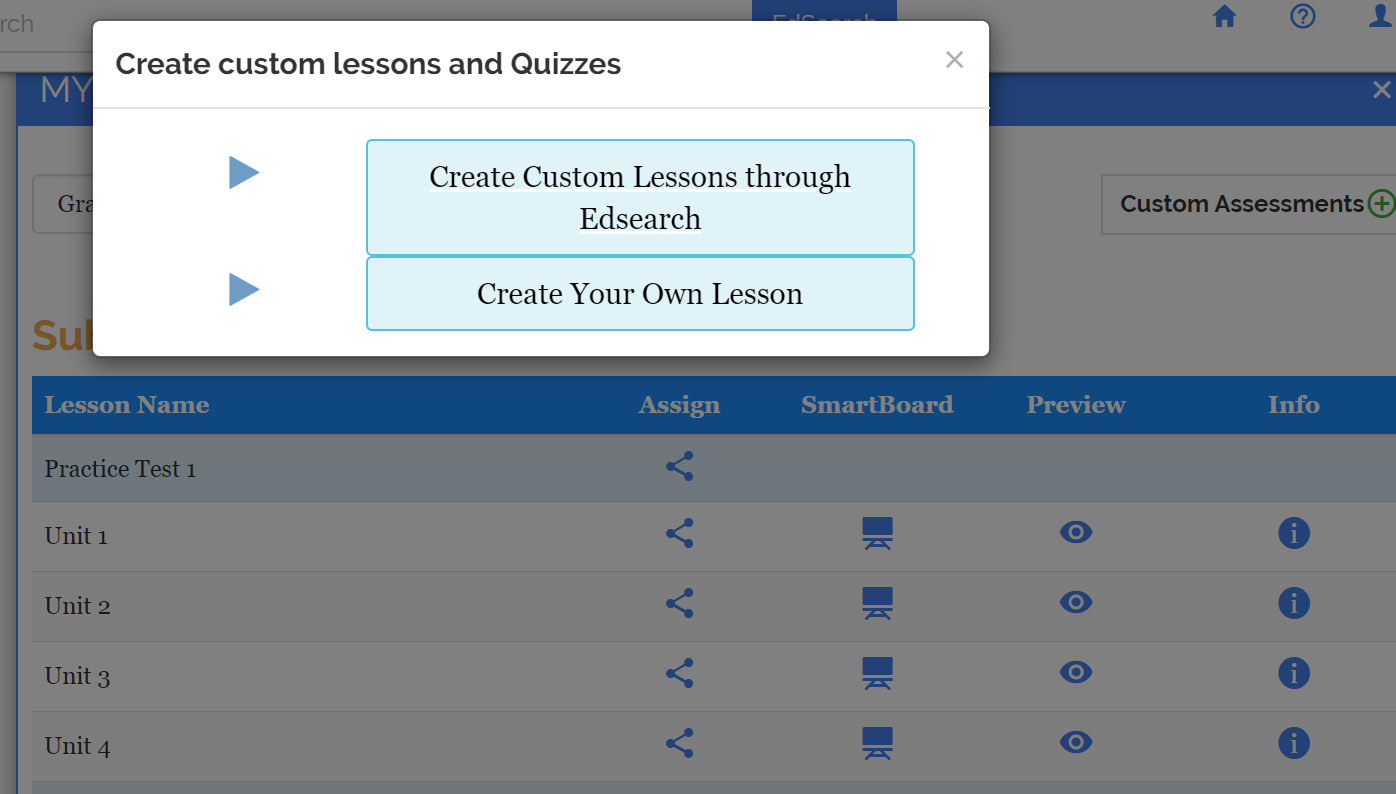
Login to your account and go to “MY LESSONS” on the left side menu. Scroll down to the end of the page and there you can find the custom lessons.
What is a custom assessment?
Custom assessment basically allows the teacher to assign individually to any or all students, or through Edsearch
What are my stickies?
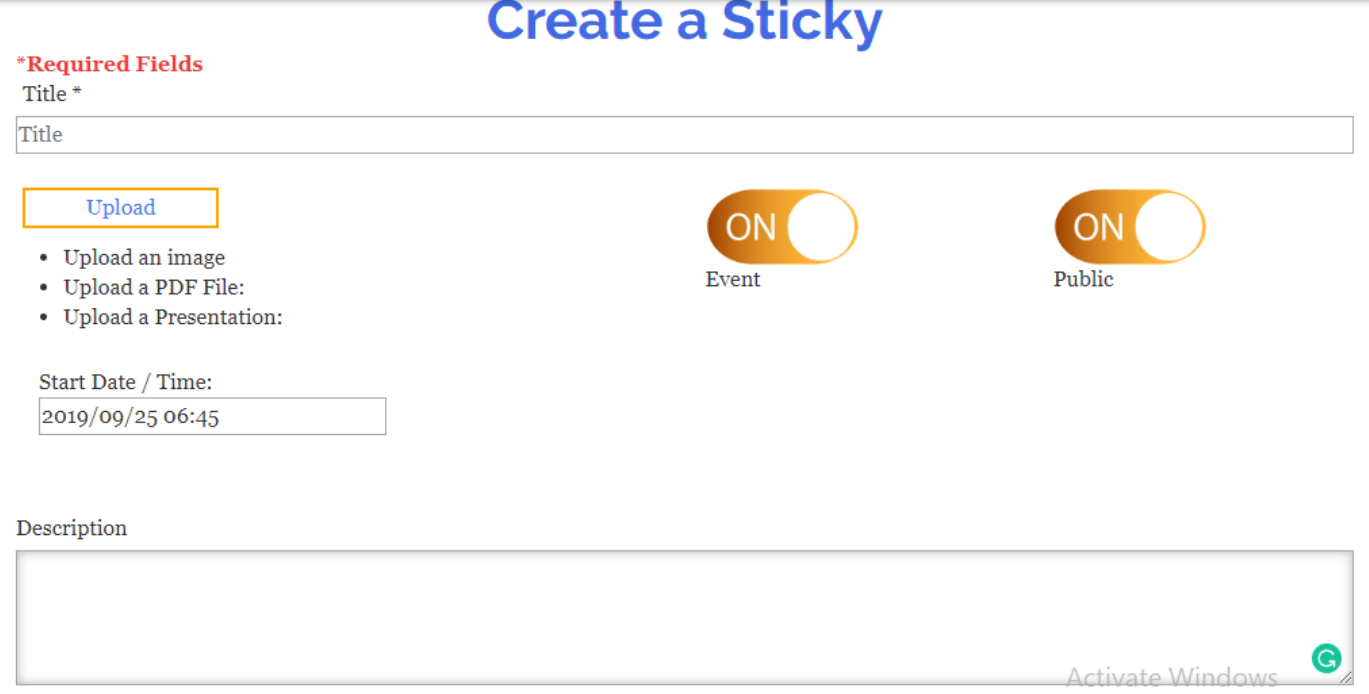
>In my stickies, you can assign in form of pdf, presentation, store images, topics which you can refer when needed. You can create an event with a description, not only for students but also for yourself. It also acts like a bookmark.
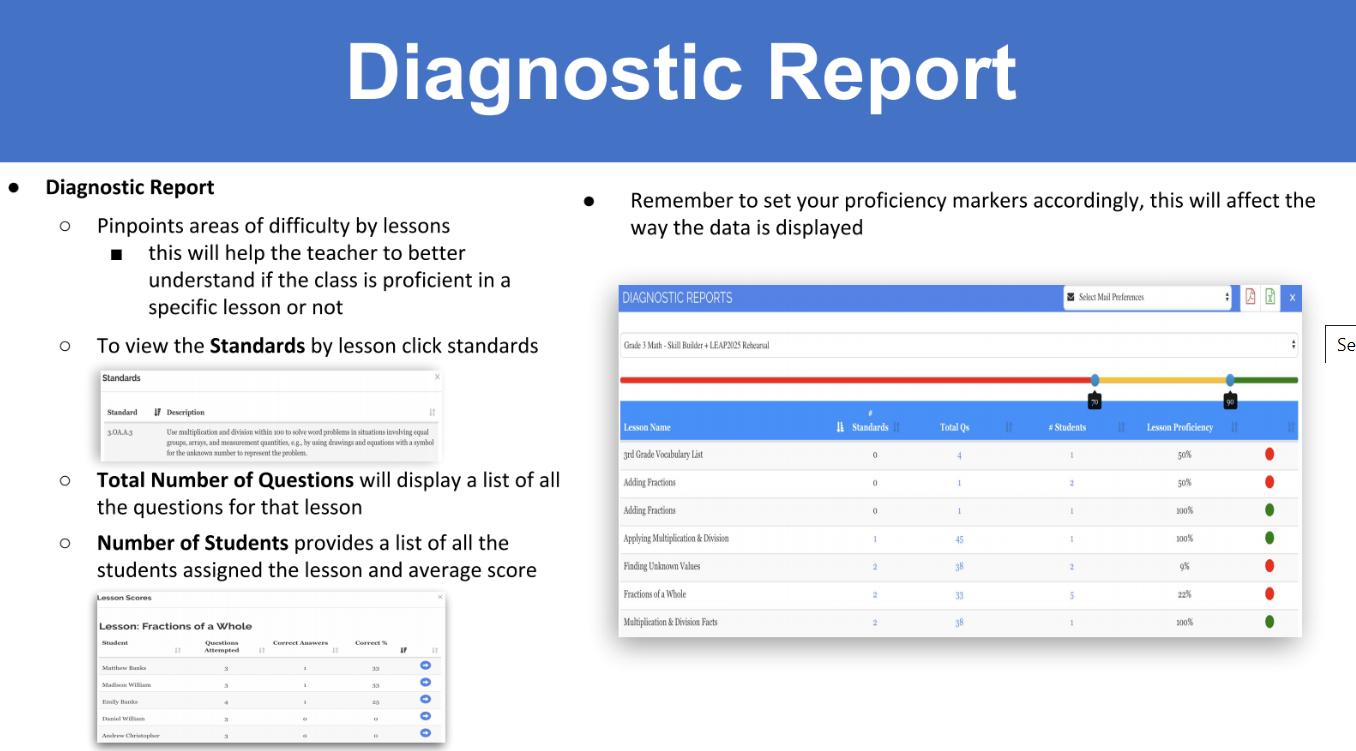
What is a Diagnostic report?
Diagnostic reports pinpoints areas of difficulty by lessons. This will help the teacher to understand better, if the class is proficient in a specific lesson or not.
What is an insight lessons report?
Proficiency by topic , lesson, for a particular lesson how well your student performed, who have attempted, not attempted, how much they have scored, how much time spent.
What is EdSearch?
Edsearch is a standards-aligned search engine, designed to help find engaging videos, apps, worksheets, ineractive puzzles, sample questions and other resources for students to practice.
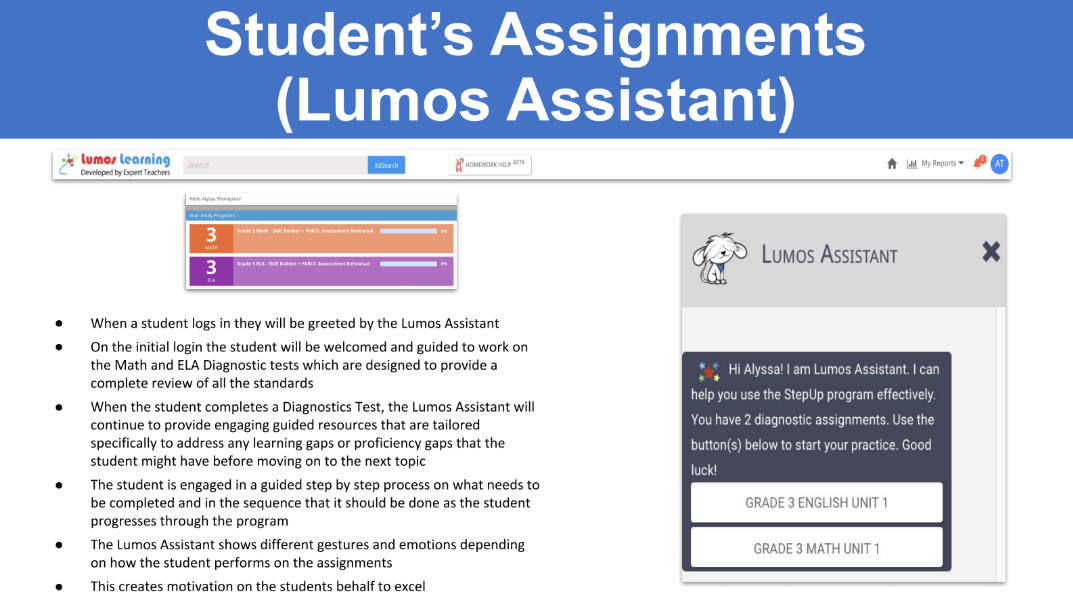
What is Lumos Assistant?
Lumos Assistant: When the student logs in, he will be greeted by the Lumos assistant. It will provide guided resources, step-by-step.
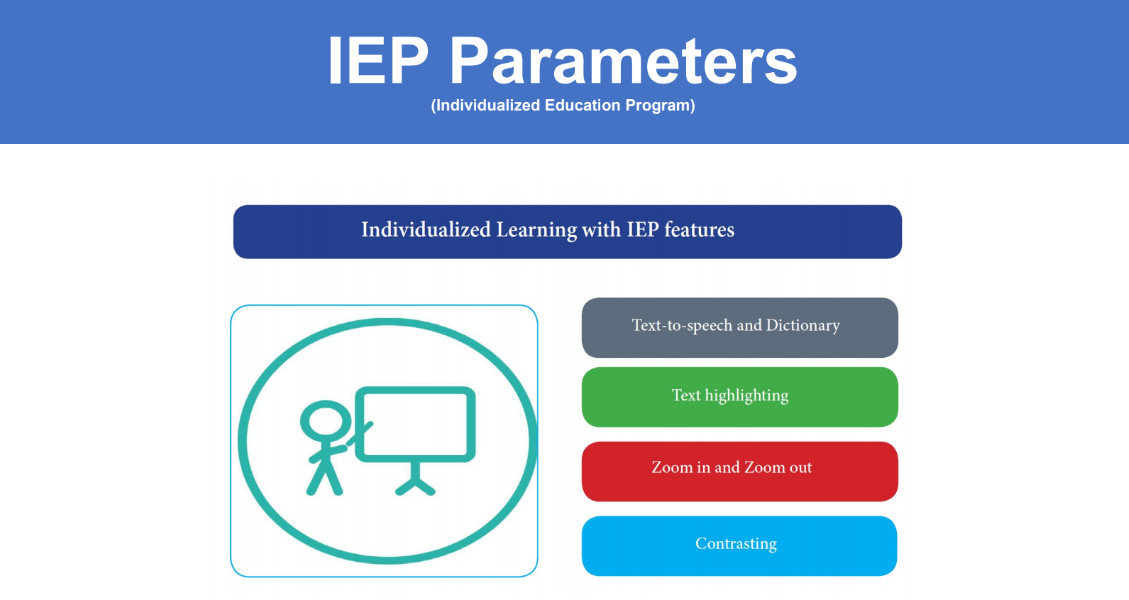
What is IEP feature?
IEP or individual educational program feature gives you access to text to speech and dictionary, text highlighting, zoom in zoom out and contrasting.
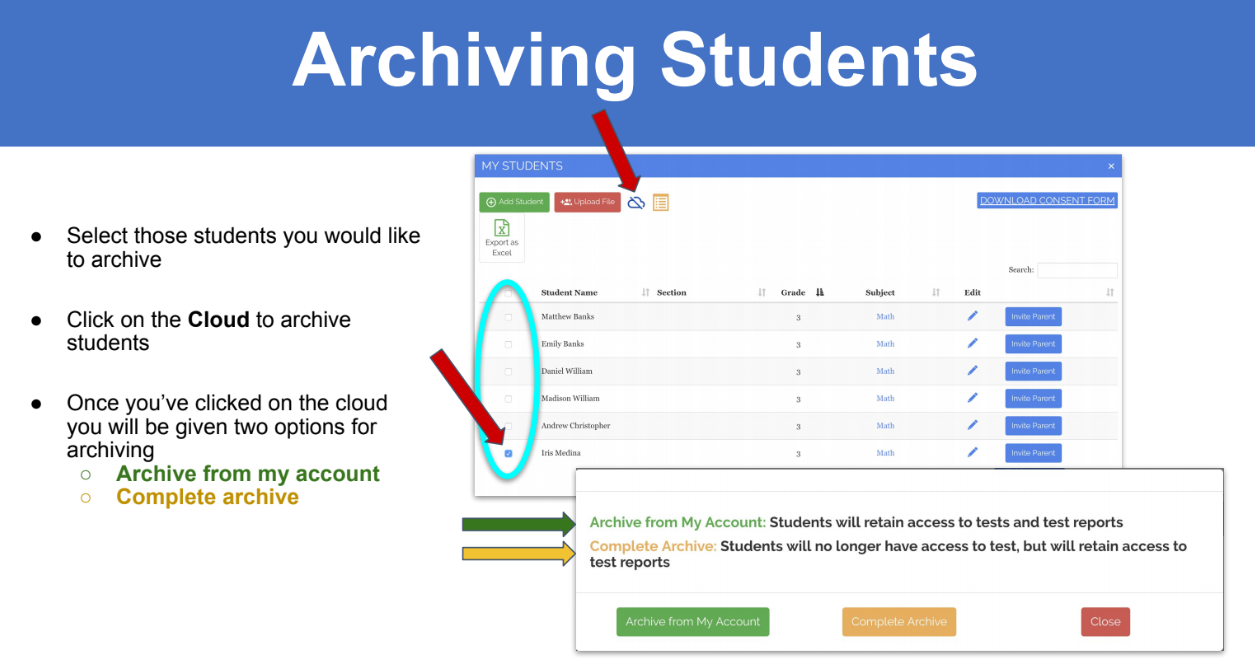
How to archive students?
Select the students that you wish to archive and click on the cloud shaped button like seen on the image. Click on that cloud button, which will display two options, one to archive from my account and the other complete archive
How to unarchive the students?
To unarchive, go to bottom right corner. where it says archived students, click on that place a check mark next to the students name and click on the blue cloud with an arrow pointing upward to restore.
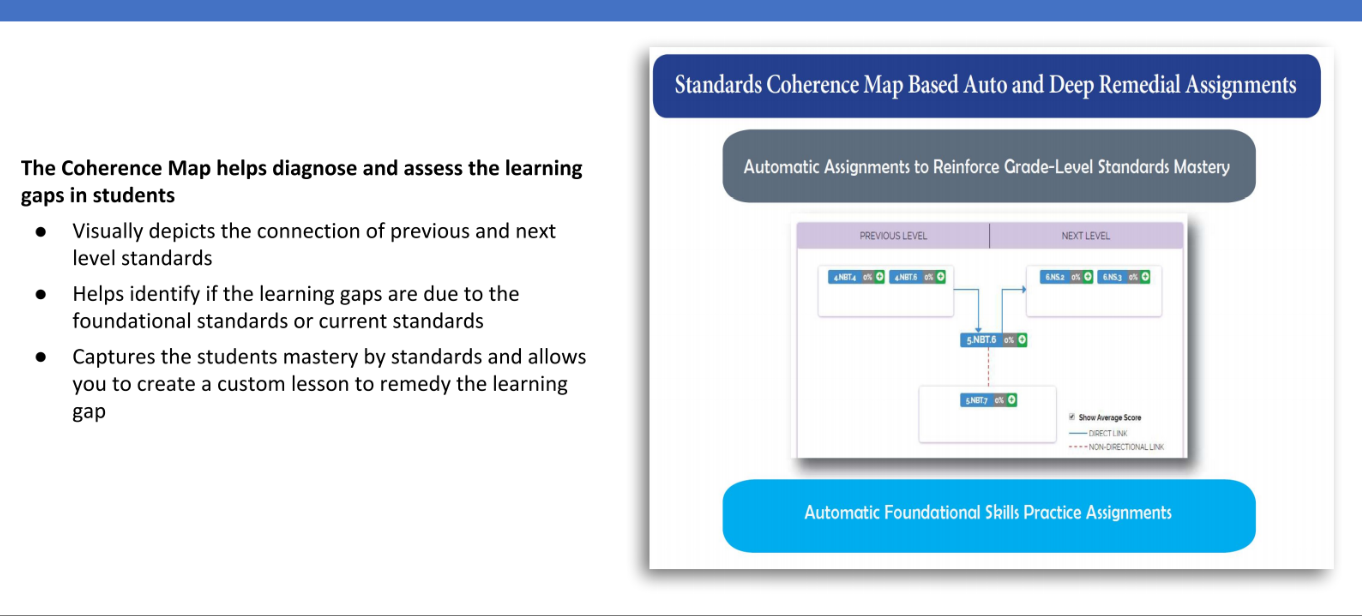
How does a coherence map help?
The coherence map helps diagnose and assess the learning gaps in students
visually depicts the connection of previous and next level standards
Captures the student mastery by standards and allows you to creat custom lesson to remedy the learning gap
Students are having difficulty logging into the program from public/shared computers.
If your students are using public/shared computers for practice, use the below link to logoff and login again to start a fresh session. https://www.lumoslearning.com/llp/logoff.php
Where do I find the personalized study plan?
After logging into the student account, if a student has taken the test, based on their performance study plan will be given. Study plan is automatically generated on the proficiency levels in each standard for what student has taken the test. And it will be displayed beside the practice test for which the student had already attempted.
Does Lumos explain to the student what they did wrong?
Yes. At the end of every test, you will have an explanation to your answers.
tedBook related FAQs
Where can I purchase the books from?
You can purchase our book using this Link
How do I add a book?
Step 1: Login to your Parent/Teacher account (Login Id: ——@example.com) Step 2: Click on “My tedBooks” under “Account” (left-hand side in the content area) Step 3: Enter the book access code (grade -) into the access code field and select “Add Student” and click on “Submit” button. Follow the same above procedure to add more books of different subject or grade.
How do I add books with the same access code?
Please send a picture of both the books together with the book access code, along with you registered email id and your preferred student login to support@lumoslearning.com.
How do I add another tedBook without the students having to log in and put in the class code again?
Step 1: Login to your Parent/Teacher account Step 2 Click on “My tedBooks” under “Account” (left-hand side in the content area) Step 3: Enter the book access code (grade -) into the access code field and select “Add Student” and click on “Submit” button.
How do I remove a tedbook?
You will not be able to remove it. Please write to us at support@lumoslearning.com along with your registered email id and the book access code.
I teach multiple grades. Can I have access to various books online?
Yes. You can have access to multiple grade level books online. First, create an account using one of the books’ access code. Then login to your account and keep on adding the access codes of each of the books you have purchased under “MY TEDBOOK” on the left side menu.
Pricing / Subscription related FAQs
How much does your program cost?
Please click on the user type to view our pricing. Parent Teacher
How much does it cost to download the worksheets we do not have student computers?
We provide free printable worksheets. You can download them from here.
What subjects will my subscription include?
Your subscription will include Math and ELA.
How can I purchase from within my account?
Please click on “My Subscriptions”. You will be to view different resources to purchase. You can purchase from there.
How do I cancel my subscription?
Please click on “My Subscriptions”. Click on “Downgrade” button.
Do you offer any discounts?
Yes, The second child would be getting a discount of 25% on their subscription.
I can’t find my school when signing up for a free account; What should I do?
Please write to us at support@lumoslearning.com along with your school name and state.
Library portal
Why are the usage metrics in Library Portal not matching what I have in the previous monthly report spreadsheets?
Please note that there might be a slight difference in the usage metrics in this Library Portal and the monthly reports that were sent you earlier. This is due to the fact that the reports here are excluding any patron access to the Lumos StepUp program before they became members of the library. Ex. If a patron had accessed the StepUp program in Nov 2017 on his own and in Jan 2018 used the subscription via their library card, the reports in this Library Portal does not count the patron access in Nov 2017. However, in the monthly reports we used to send in the past, we used to count both Nov 2017 and Jan 2018 usage.
Billing
What payment methods do you accept?
Master Card, Visa, American Express, Discover and PayPal.
General Information
What software do I need?
All you need is a personal computer with internet access. No software installation is necessary. We recommend that you access the Lumos Online Program using a personal computer with Microsoft Internet Explorer version 6 or higher with broadband internet connection.
Should I buy the books or the online program?
When you purchase books, you get the printed practice test books with detailed answer explanations and one-year access to online workbooks. Printed books are ideal for students that focus better without the computer. Using the online program, students can access both full-length practice tests and workbooks using any computer with internet access and a browser. Please select the option that best fits your child’s learning habits. Note that books are not available for all grades and subjects.
How soon will I have access after I sign up?
You will have immediate access to the training program after you pay. Just click on the “Begin” link associated with the course you’ve purchased.
Do I need to register?
Yes, registration is required to purchase the product. Please note that the registration itself is free. Payment is required for any courses purchased. Payment is not required if you are accessing the program through your school or library subscription. Lumos Learning is very sensitive to privacy issues.
Will I receive anything in the mail?
No, you will not receive any material through regular mail.
My Students are being logged off in between the test.
Lumos Learning website uses cookies. Please enable cookies in your browser to ensure that your website perform optimally.
Based on the browser that you are using, please use the instruction below to enable cookies.
To enable cookies for Google Chrome
To enable cookies for Firefox Browser
To enable cookies for Internet Explorer
To enable cookies In Safari
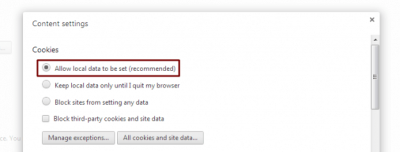
Google Chrome:Step 1: Launch Google Chrome –> click on Chrome menu icon. Step 2: Click the Settings option –> Afterward, click the blue Show advanced settings option at the bottom of the page, followed by the gray Content settings button located beneath the Privacy section.

Step 3: Enable cookies — Check the bubble directly left of the Allow local data to be set (recommended) option near the top of the resulting pop-up window to enable browser cookies. Click the gray Done button in the bottom-right corner when finished.
 Mozilla FireFox:
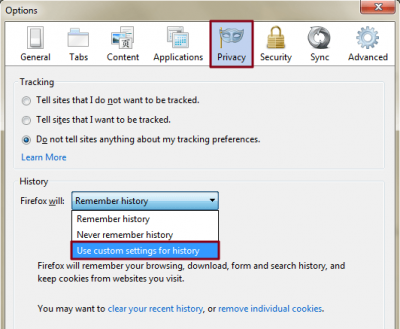
Step 1: Open settings — Open Mozilla Firefox, click the main Firefox button in the upper-left corner of the browser window and select Options from the right side of the resulting drop-down menu. Afterward, click the masked Privacy tab located in the top navigation bar and select the Use custom settings for history option in the drop-down menu of the panel’s History section.
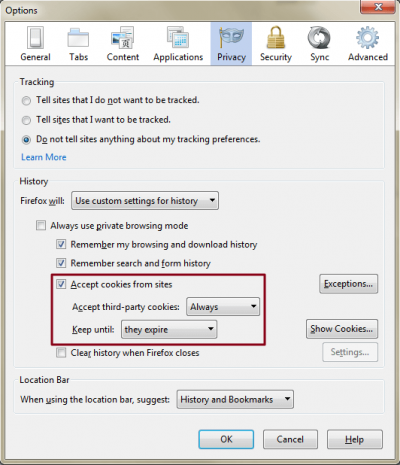
Step 2: Enable cookies — Check the box directly left of the Accept cookies from sites option near the middle of the History section to enable browser cookies. Although disabling third-party cookies has been known to stop some types of ad tracking, you can use the drop-down menu beneath the checkbox to ensure Accept third-party cookies is set to Always. Afterwards, use the drop-down menu to the right of Keep until to specify how long you’d like Firefox to store cookies. Additionally, clicking the gray Show cookies and Exceptions buttons will provide you with an extensive list of stored cookies and a means of adding individual host names to the list. Click the gray OK button located at the bottom of the window when finished.
 Internet Explore:
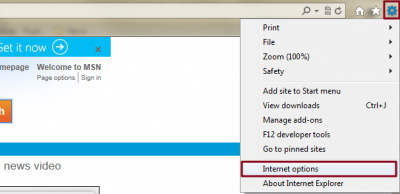
Step 1: Open settings — Launch Internet Explorer, click the Tools menu icon represented by the cog in the upper-right corner of the browser window, and select Internet options near the bottom of the resulting drop-down menu. Then, click the Privacy tab located in the top navigation bar.
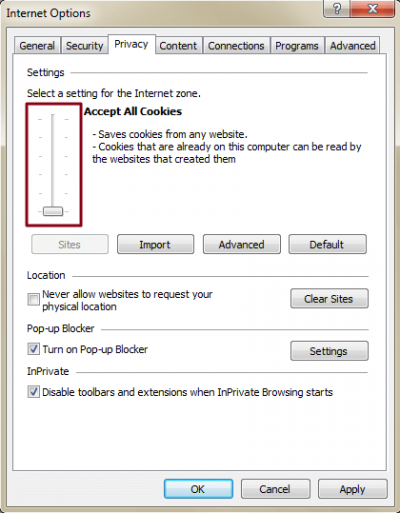
Step 2: Enable cookies — Move the slider within the Settings section of the Privacy tab all the way to the bottom to accept all browser cookies. Then, click the gray Advanced button near the bottom of the slider and check the box directly left of the Override automatic cookie handling option to access first and third-party cookie blocking. Adjusting the slider up from Accept all cookies to Low will grant options for adding individual host names to the list through the gray Sites button beneath the slider. Click the gray OK button located at the bottom of the window when finished.
 Safari:
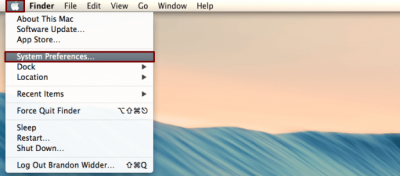
Step 1: Navigate the settings panel — Launch Safari, click Safari in upper-left corner of the main menu bar, and select the Preferences option near the top of the drop-down menu. Afterward, click the silhouetted Privacy tab located in the top navigation bar.
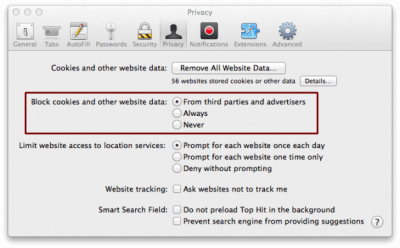
Step 2: Enable cookies — Check the box beside the Always option located directly right of Block cookies and other website data to enable browser cookies. Alternatively, select either of two other options to greater adjust your cookie functionality or click the gray Details button near the top of the window to view an extensive list of stored cookies,. Here, they’re broken down by the number of cookies and other data. Click the close button in the top-left corner when finished.